
ASSIGNMENT // CREATE A SKETCH:
For the final project, we are simply asked to make something that incorporates a variety of concepts we have learned and incorporate them in a way that challenges us.
“In the course of making your final project, you are expected to push your abilities to produce something that utilizes what you have learned in the class that is useful in some manner to yourself or the world.”
⋅˚₊‧ ୨୧ ‧₊˚ ⋅
My Barbie flash game inspired troll dress up game has come together and according to chatGPT has 3,456 different unique combinations possible! And while I don’t really feel it is complete with all of the functionality I envisioned, it has come pretty darn close. 𐙚⋆°.
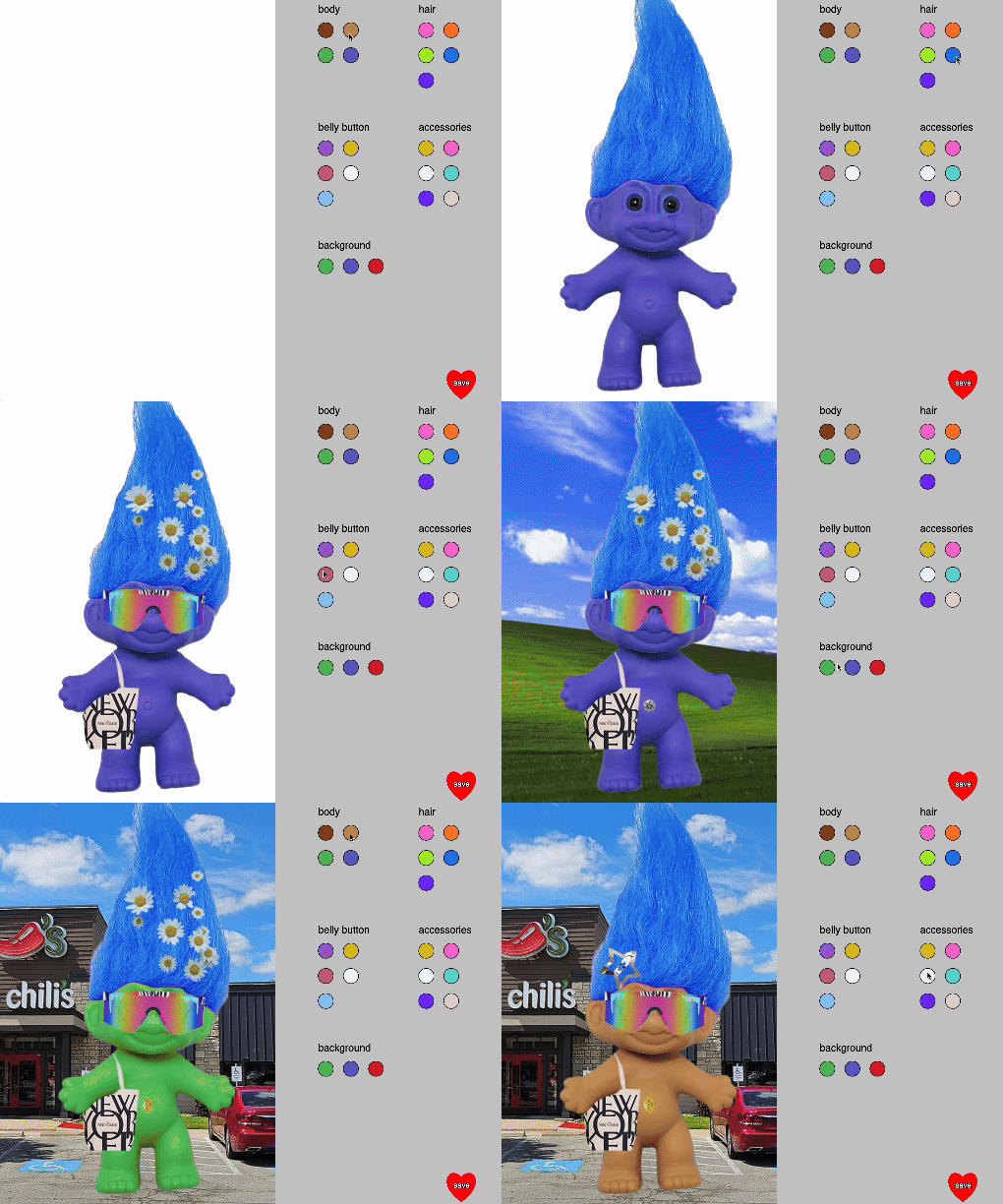
The first step I took with this website was gathering all the options I wanted for the dress up concept and manipulating them in Photoshop. For some items it was as simple as removing the background and scaling it down to fit my troll character (the accessories and belly button) while others required masking and manipulation of colors (body tones and hair color).
While the process was a little tedious, it helped me map out how I wanted everything to look on the troll doll and allowed me to have a fixed ‘map’ of how everything would layer with each other to keep things simple when I laid it out in p5.js. 𐙚⋆°.
I also used a mouseX and mouseY tracking in the draw function to help get a sense of spacing and where things were at on the canvas. This helped me measure the rough locations of where I wanted buttons to go and then I could use math to calculate for the rest to make it uniform looking. 𐙚⋆°.
//I used this to help navigate and space everything out on the canvas when first laying it out

function draw() {
  text("(" + mouseX + ", " + mouseY + ")", mouseX, mouseY);
}
For each item I had to create variables as well as preload it into the sketch. There was a lot of variables and functionality linked to them so I annotated my code like crazy to help keep everything organized. It really helped when I was looking at a wall of code to find the pieces I needed quickly and easily so while it took more time up front I am glad I took the time to organize it this way. 𐙚⋆°.
I originally wanted to have a drag and drop function that would snap the items to a certain location on my troll character, but that proved to be a little difficult. I think if I came back and did this again, I would restart in p5.play and follow a tutorial I found online that goes through this exact process. Unfortunately, I found this tutorial a little too late after I had started and while I was able to load the p5.play library to my project, I was not able to make it all work together.
I then had to pivot to using buttons to load the various character customization options. I created circles under each category that can be used to customize the troll doll. Just as each item had to have a corresponding variable, each activated image option also had to have a variable.
HERE IS AN EXAMPLE OF CODE USED FOR THE SKIN TONE OPTION

//troll body
let brBody;

function preload() {
  brBody = loadImage('/body/body_br_01.png');
}

function draw() {
// *** BODY BUTTONS ***
//earth tone
  push();
  fill(138,70,25);
  circle(650, 125, 30);
  pop();

// *** KEEPS TRACK OF TRACK OF ACTIVE IMAGE
  if (currentBody) {
    image(currentBody, imgX, imgY);
  }
}

function mousePressed() {
//*** BODY COLOR CHANGE ***
  //check if mouse is inside earth tone button
  if (dist(mouseX, mouseY, 650, 125) < 15) {
    currentBody = brBody;
  }
}
For example, all of the hair colors were their own variables but then were nested in the hair color variable so that only one color could be loaded to the canvas at one time. This also allowed for flexibility in terms of how I wanted to stack different accessories together. An example of this being only one hair accessory can be visible at one time but the troll doll can be wearing sunglasses, a tote, and be holding an accessory all at the same time because they are images that live under different parent variables.
//troll body
let brBody; let tBody; let blBody; let gBody;

//troll hair
let orHair; let pkHair; let bluHair; let prpHair; let limeHair

//troll belly buttons
let bb1; let bb2; let bb3; let bb4; let bb5;

//troll backgrounds
let chilis; let hill; let crystals;

//troll accessories
let daisy; let starB; let bow; let pitties; let gbColor; let nyTote;

//variable to keep track of currently displayed image
let currentBG = null;
let currentBody = null;
let currentHair = null;
let currentBellyButton = null;
let currentHairPiece = null;
let currentGlasses = null;
let currentBag = null;
let currentHandHeld = null;

//heart for save button
let heartX = 920; // X position of the heart
let heartY = 810; // Y position of the heart
let heartSize = 50; // Size of the heart
Essentially, there is just variables on variables on variables… I don’t think I have even used half as many in one sketch yet as I have for this one. 𐙚⋆°.
Finally I wanted to create functionality so that people could download and save the troll doll they created. I decided to create a heart-shaped save button at the bottom. I asked chatGPT to help walk me through getting the heart shape just right and also asked for help with the code to save the troll. While I understood the concept overall, it was helpful to understand how I could take a snapshot of only part of the canvas and not the entire thing.
function drawHeart(x, y, size) {
  push();
  fill(255, 0, 0);
  noStroke();
  beginShape();
  vertex(x, y);
  bezierVertex(x - size / 2, y - size / 2, x - size, y + size / 3, x, y + size);
  bezierVertex(x + size, y + size / 3, x + size / 2, y - size / 2, x, y);
  endShape(CLOSE);
  pop();
}

//check if the mouse is inside heart
  if (dist(mouseX, mouseY, heartX, heartY) < heartSize) {
//define portion of the canvas to save
//x of the top-left corner
    let portionX = 0;
//y of the top-left corner
    let portionY = 0;
//width of save
    let portionWidth = 550;
//height of save
    let portionHeight = 900;

//save portion of canvas as an image
    let portion = get(portionX, portionY, portionWidth, portionHeight);
    portion.save('troll', 'png');
  }
⋅˚₊‧ ୨୧ ‧₊˚ ⋅
While overall I am really happy with how this concept came out, I would definitely like to make some small edits to the piece…
- Drag and drop functionality that includes a ‘snap to grid’ option to keep things looking clean
I would like the accessories to be drag and drop so that the user can drag items over and have them snap to a set point on the troll doll. - Reset buttons that clear accessory items
In case people don’t want certain accessories I would like to create a reset button that takes them all away so that the user can go back to the basic set up of body and hair options. - More polished/stylized UI
I would like the buttons to have a more polished look and include more ‘branded’ elements like a unique font and title treatment.
I also would like to add some things that I didn’t get to…
- Sounds/music that can be accompanied with different music accessories
Include music accessories like an iPod, walkman, musical instrument that has different music associated with them - Randomizer button
Add a randomizer button that will give users a completely random combination every time they hit the button.
⋅˚₊‧ ୨୧ ‧₊˚ ⋅
Shout out to all the people who share their work with the world for the rest of us to admire and learn from! Here are some resources I found helpful throughout this process:
- p5.js Code References
(used specifically for referencing use of images in code) - This sketch by prewiredonline gave me the code to do coordinates that follow the mouse so I could space things out nicely on the canvas
- This YouTube tutorial helped with the drag and drop functionality when I was working on it the syntax for p5play which I might come back to and remake everything there
- I used ChatGPT to help debug some code, help with the code for the heart, as well help on the code needed to save a partial screenshot of the canvas
⠀⠀⠀⠀⠀⠀⠀⠀⠀⠀⠀⠀⠀⠀⠀⠀⠀⠀⠀⠀⠀⠀⠀⠀⠀⠀⠀⠀⢀⣀⣀⣀⡀⠀⠀⠀⠀⠀⠀⠀⠀⠀⠀⠀⠀⠀⠀
⠀⠀⠀⠀⠀⠀⠀⠀⠀⠀⠀⠀⠀⠀⠀⠀⠀⠀⠀⠀⠀⠀⠀⠀⠀⠀⠀⣠⣿⣅⣀⢈⣩⣷⣶⣦⣄⡀⠀⠀⠀⠀⠀⠀⠀⠀⠀
⠀⠀⠀⠀⠀⠀⣀⠴⣒⣤⣀⡲⣶⣤⣀⠀⠀⠀⠀⠀⠀⠀⠀⠀⠀⢀⢾⣿⣯⡿⠟⠋⠈⠻⡛⠋⠹⣗⡄⠀⠀⠀⠀⠀⠀⠀⠀
⠀⠀⠀⠀⣠⠊⢔⢉⢙⣹⡿⠳⣙⡊⣓⣉⣒⡤⡀⠀⠀⠀⠀⠀⣰⡟⣡⠟⠁⠀⠀⠀⠀⠀⠈⠑⠢⡍⡧⠀⠀⠀⠀⠀⠀⠀⠀
⠀⠀⠀⠐⡇⠀⠻⣿⠟⠁⠀⠀⠀⠉⠉⠻⣟⠋⠙⠓⢤⣠⡴⣶⡿⣛⣉⣁⠒⠢⣄⣀⠀⣀⣤⡶⢺⣷⠇⠀⠀⠀⠀⠀⠀⠀⠀
⠀⠀⠀⠀⠱⡀⢾⠁⠀⠀⠀⣀⡠⠤⠶⠒⣺⠿⣟⢠⣯⣃⣳⡾⠲⠷⣮⣥⣴⣮⣤⣤⣬⣿⣟⣻⡿⠏⠀⠀⠀⠀⠀⠀⠀⠀⠀
⠀⠀⠀⠀⠀⠈⠢⣷⣦⣤⣾⣿⣷⣶⡂⢉⡤⢊⣥⣿⡿⠿⠿⢿⣦⣤⣀⠈⠉⠉⠉⠉⠉⠀⠀⠀⠀⠀⢀⡤⢤⣄⡀⠀⠀⠀⠀
⠀⠀⠀⠀⠀⠀⠀⠀⠀⠈⠉⠉⠛⠛⠛⠋⡴⣻⣿⠏⠀⠀⠀⠘⢿⢯⠀⠳⣄⠀⠀⠀⠀⠀⠀⠀⢀⠔⠁⠀⢀⢽⣿⣦⡄⠀⠀
⠀⠀⠀⠀⠀⠀⠀⠀⠀⠀⠀⠀⠀⠀⢀⠎⣡⢁⡏⠀⠀⠀⠀⠀⠈⠫⣳⠄⢹⡆⠀⠀⠀⠀⣠⣴⣿⣿⣿⠞⠁⠈⢿⢿⡷⠀⠀
⠀⠀⣰⣾⣏⠩⡉⠰⣄⠀⠀⠀⠀⢠⢂⡴⢛⠎⠀⠀⠀⠀⠀⠀⠀⠀⠉⠷⣾⣿⡀⠀⢠⣾⣿⣿⡿⠟⠁⠀⠀⠀⣸⣾⠃⠀⢀
⠀⣰⡇⠈⠙⠤⣽⣧⣹⣷⣤⣀⣴⣡⡤⠔⠁⠀⠀⠀⠀⠀⠀⠀⠀⠀⠀⠀⠀⠉⠓⠒⠛⠛⠋⠁⠀⠀⠀⣀⣴⣾⡿⠁⠀⠀⠘
⢰⣟⣹⡄⠀⠀⠀⠉⠛⠻⠿⠛⠋⠉⠀⠀⠀⠀⠀⠀⠀⠀⠀⠀⠀⠀⠀⠀⠀⠀⠀⠀⠀⠀⢀⣀⡀⢀⡖⠁⢸⣿⠃⠀⠀⠀⠀
⢹⡇⠂⢡⠀⠀⠀⠀⠀⠀⠀⠀⠀⠀⠀⠀⠀⠀⠀⠀⠀⠀⠀⠀⠀⠀⠀⠀⠀⠀⠀⠀⠀⣰⡁⠀⠠⣬⣧⣀⡜⠁⠀⠀⠀⠀⠀
⠀⠱⡄⠀⠣⠀⣠⣤⣤⣀⠀⠀⠀⠀⠀⠀⠀⠀⠀⠀⠀⠀⠀⠀⠀⠀⠀⠀⠀⠀⠀⠀⠀⢻⣿⢶⠃⠙⠋⠉⠀⠀⠀⠀⠀⠀⠀
⠀⠀⠈⠢⢀⣙⠿⣿⡿⢿⣷⠀⠀⠀⠀⠀⠀⠀⠀⠀⠀⠀⠀⠀⠀⠀⠀⠀⠀⠀⠀⠀⠀⠀⠻⡾⡄⠀⠀⠀⣀⣀⠀⠀⠀⠀⠀
⠀⠀⠀⠀⠀⠈⠑⠊⠁⢀⣿⠀⠀⠀⠀⠀⠀⠀⠀⠀⠀⠀⠀⠀⠀⠀⠀⠀⠀⠀⠀⠀⠀⠀⠀⠈⠺⢷⣿⣿⡶⠤⢕⡄⠀⠀⠀
⠀⠀⠀⣠⠔⠂⢶⣶⣿⠟⠁⠀⠀⠀⠀⠀⠀⠀⠀⠀⠀⠀⠀⠀⠀⠀⠀⠀⠀⠀⠀⠀⠀⠀⠀⠀⠀⠀⠀⠀⠀⠀⡸⠁⠀⠀⠀
⠀⣠⡎⠀⣀⣠⡾⠟⠃⠀⠀⠀⠀⠀⠀⠀⠀⠀⠀⠀⠀⠀⠀⠀⠀⠀⠀⠀⠀⠀⠀⠀⠀⠀⠀⠀⠀⠀⠀⠀⠀⠈⠁⠀⠀⠀⠀
⠀⣿⠋⠉⠀⠀⠀⠀⠀⠀⠀⠀⠀⠀⠀⠀⠀⠀⠀⠀⠀⠀⠀⠀⠀⠀⠀⠀⠀⠀⠀⠀⠀⠀⠀⠀⠀⠀⠀⠀⠀⠀⠀⠀⠀⠀⠀
⠀⡁⠀⠀⠀⠀⠀⠀⠀⠀⠀⠀⠀⠀⠀⠀⠀⠀⠀⠀⠀⠀⠀⠀⠀⠀⠀⠀⠀⠀⠀⠀⠀⠀⠀⠀⠀⠀⠀⠀⠀⠀⠀⠀⠀⠀⠀
⠀⠀⠀⠀⠀⠀⠀⠀⠀⠀⠀⠀⠀⠀⠀⠀⠀⠀⠀⠀⠀⠀⠀⠀⠀⠀⠀⠀⠀⠀⠀⠀⠀⠀⠀⠀⠀⠀⠀⠀⠀⠀⠀⠀⠀⠀⠀
⠀⠀⠀⠀⠀⠀⠀⠀⠀⠀⠀⠀⠀⠀⠀⠀⠀⠀⠀⠀⠀⠀⠀⠀⠀⠀⠀⠀⠀⠀⠀⠀⠀⠀⠀⠀⠀⠀⠀⠀⠀⠀⠀⠀⠀
 itp oddities
Leave a comment