PERSONAL REFLECTION:
As I continue to learn new things, I am seeing so many ways for the things I already love to intersect with the projects I am making. I wouldn’t say that I have a clear view of what or who I want to be, but it is starting to manifest in the things I gravitate towards.
It is now though that I am really feeling the limitations of what I can accomplish which is holding me back. It is so hard to be patient with building the fundamentals and struggling through everything I don’t know when I can see where the end will lead but lack the skill to navigate the road that gets me there.
I don’t have an engineer’s brain. I don’t have a natural proclivity for mathematics. I don’t have an established artistic practice. What I do have is a vision and a stubborness to see the things I want to make a reality.
I am making for the future me who will be thankful I stuck it through. I am making for the current me who is doing my best to balance the time demanded by a full course load along with work. I am making for past me who dreamed of being where I am today.
I may not get there as fast as I want to, but I will frustratingly admit that practicing patience and discipline is probably as useful as the actual hard skills I am learning and definitely just as important.
⋆ ݁。˚ ˖‧☁︎ ˚ ݁。˖‧⋆。˚ ݁✦˚。⋆。
ASSIGNMENT // CREATE A SKETCH:
The assignment this week was to create a sketch in pairs that:
For this assignment, you’ll be working in pairs. Make a rule-based animation that incorporates motion and interaction and includes a user interface element of your own design. Things to try:
- When working in teams, try working separately and then combining your work together. Overlay your sketches, or have the interface element you created control your partner’s algorithmic design (and vice versa). Trade sketches and riff on your partner’s work. Or, sit next to each other at one keyboard and take turns coding while looking over each other’s shoulder.
- Makes a rule-based animation that incorporates motion and interaction and includes a user interface element of your own design.
- Make a rollover, a button, or a slider from scratch
- Create an algorithmic design with simple parameters. Make the interface element control the appearance or behavior of the algorithmic design.
For this assignment, I was working with Helen. We came up with the idea of a tv screen and remote that we can use to turn on and off an animation using a button. Here is a link to the sketch. ⋆.ೃ 。˚
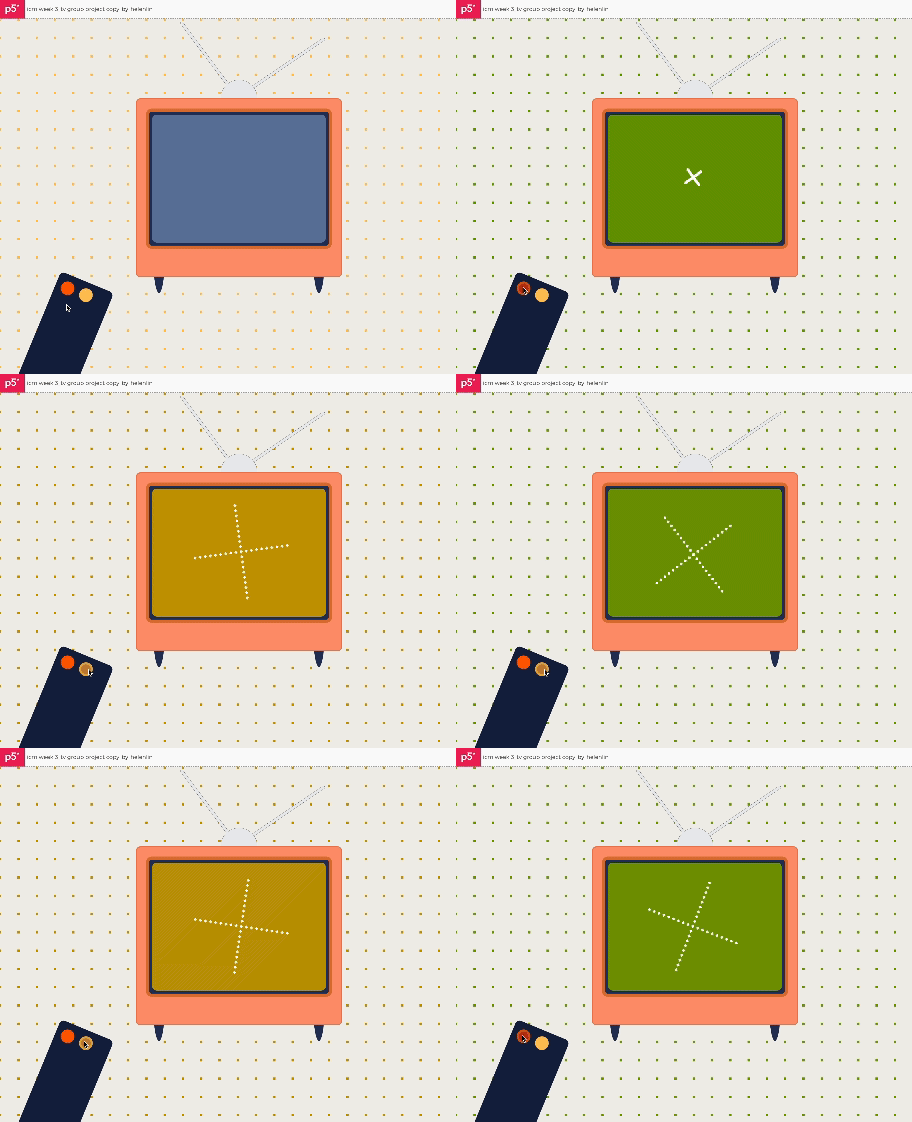
We started out by creating the TV and remote through the use of various shapes and plenty of push() and pop() to help with the shifting of the location and rotation of individual shapes.
We then added in the interactive video element to be played on the TV when the remote button is pressed. ⋆.ೃ 。˚
We had a separate playAnimation() function to organize our code a bit. The playAnimation() function would only be called if the TV was on. It would draw an X shape of spinning squares centered in the middle of the tv screen. We used push() and pop() before and after it was being drawn because the squares were consistently being located.
Then another interactive yellow button was added that only works if the tv is already on. While the animation is playing, if the yellow button is pressed, it slows down the spin by reducing the rotateConstant.
We then created the background that is interactive with the TV colors. The nested for loops helped draw a square every 40 pixels. We forgot to add in the stroke and fill, but thought it looked cool to see the size and color change slightly as the buttons were being pressed and animations were being played. ⋆.ೃ 。˚
Here are the things I would love to incorporate in future iterations of this sketch:
- More Buttons
Ideally I would like to fill a remote with buttons that all do different things. - Sound
It would be really cool to involve sound and/or volume like a real TV. - Different Background
I would like to construct the background to look like a room or field or various other spaces to place the TV in.
⠀⠀⠀⠀⠀⠀⠀⠀⠀⠀⠀⠀⠀⠀⠀⠀⠀⠀⠀⠀⠀⠀⠀⠀⠀⠀⠀⠀⠀⠀
⠀⠀⠀⠀⠀⠀⠀⢠⣀⠀⠀⠀⠀⠀⠀⠀⠀⠀⠀⠀⠀⣀⡄⠀⠀⠀⠀⠀⠀⠀
⠀⠀⠀⠀⠀⠀⠀⠀⠉⠻⣦⣄⠀⠀⠀⠀⠀⠀⣠⣴⠟⠉⠀⠀⠀⠀⠀⠀⠀⠀
⠀⠀⠀⠀⠀⠀⠀⠀⠀⠀⠀⠉⣠⣴⣶⣶⣦⣄⠉⠀⠀⠀⠀⠀⠀⠀⠀⠀⠀⠀
⠀⠀⠀⣀⣀⣀⣀⣀⣀⣀⣀⣀⣉⣉⣉⣉⣉⣉⣀⣀⣀⣀⣀⣀⣀⣀⣀⠀⠀⠀
⠀⠀⢸⣿⠟⠛⣛⣛⣛⣛⣛⣛⣛⣛⣛⣛⣛⣛⠛⠛⠛⠛⢿⡿⠛⠿⣿⡇⠀⠀
⠀⠀⢸⡏⢠⣾⣿⣿⣿⣿⣿⠿⠛⠋⠉⠁⠀⠀⠀⠀⠀⠀⢸⣇⠀⠀⣽⡇⠀⠀
⠀⠀⢸⡇⢸⣿⣿⣿⠟⠋⠀⠀⠀⠀⠀⠀⠀⠀⠀⠀⠀⠀⢸⣿⣿⣿⣿⡇⠀⠀
⠀⠀⢸⡇⢸⣿⡿⠁⠀⠀⠀⠀⠀⠀⠀⠀⠀⠀⠀⠀⠀⠀⢸⣿⣿⣿⣿⡇⠀⠀
⠀⠀⢸⡇⢸⡟⠀⠀⠀⠀⠀⠀⠀⠀⠀⠀⠀⠀⠀⠀⠀⠀⢸⡿⠿⠿⣿⡇⠀⠀
⠀⠀⢸⡇⠸⠁⠀⠀⠀⠀⠀⠀⠀⠀⠀⠀⠀⠀⠀⠀⠀⠀⢸⡷⠶⠶⣾⡇⠀⠀
⠀⠀⢸⡇⠀⠀⠀⠀⠀⠀⠀⠀⠀⠀⠀⠀⠀⠀⠀⠀⠀⠀⢸⡷⠶⠶⢾⡇⠀⠀
⠀⠀⢸⣿⣄⠀⠀⠀⠀⠀⠀⠀⠀⠀⠀⠀⠀⠀⠀⠀⠀⢀⣼⣷⣶⣶⣿⡇⠀⠀
⠀⠀⠘⠛⠛⠛⠛⠛⠛⠛⠛⠛⠛⠛⠛⠛⠛⠛⠛⠛⠛⠛⠛⠛⠛⠛⠛⠃⠀⠀
 itp oddities
Leave a comment